Malware Analyse Sandbox Setup
- Jean-Christophe Miler
- Soc , Cybersecurity
- 12 februari 2026
Table of Contents
Overzicht
Bouw een veilige malware analyse omgeving voor SOC-analisten om veilig kwaadaardige samples te analyseren en dreigingsinformatie te extraheren.
Leerdoelen
- Ontwerp en implementeer een veilige malware analyse omgeving
- Voer statische en dynamische malware analyse uit
- Extraheer IOCs uit kwaadaardige samples
- Documenteer malware gedrag en mogelijkheden
- Creëer effectieve detectieregels
Projectstructuur
malware-analysis-sandbox/
├── setup/
│   ├── virtualization-setup/
│   ├── network-isolation/
│   ├── tools-installation/
│   └── security-hardening/
├── samples/
│   ├── benign/
│   ├── suspicious/
│   └── malware/
├── analysis-scripts/
│   ├── static-analyzer.py
│   ├── dynamic-monitor.py
│   ├── ioc-extractor.py
│   └── report-generator.py
├── tools/
│   ├── yara-rules/
│   ├── config-files/
│   └── monitoring-scripts/
├── documentation/
│   ├── setup-guide.md
│   ├── safety-procedures.md
│   └── analysis-workflows.md
├── reports/
│   └── malware-analysis-template.md
└── README.md
Benodigde Tools & Software
Virtualisatie Platform
- VMware Workstation/VirtualBox
- Windows 10/11 Analyse VM
- Ubuntu Server voor monitoring
- Netwerk isolatie configuratie
Analyse Tools
Statische Analyse
- PEStudio: PE bestand analyse
- Strings: String extractie
- Exeinfo PE: Bestandsidentificatie
- Hash My Files: Hash berekening
- YARA: Patroonmatching
Dynamische Analyse
- Process Monitor (ProcMon): Systeem monitoring
- Process Explorer: Proces analyse
- Wireshark: Netwerk capture
- API Monitor: API call monitoring
- RegShot: Register wijzigingen
Geavanceerde Tools
- Ghidra: Reverse engineering
- x64dbg: Debugging
- OllyDbg: Alternatieve debugger
- IDAPRO: Professionele disassembler (Optioneel)
Monitoring & Logging
- OSQuery: Systeem monitoring
- Sysmon: Systeem event logging
- Autoruns: Opstartprogramma analyse
- TCPView: Netwerkverbinding monitoring
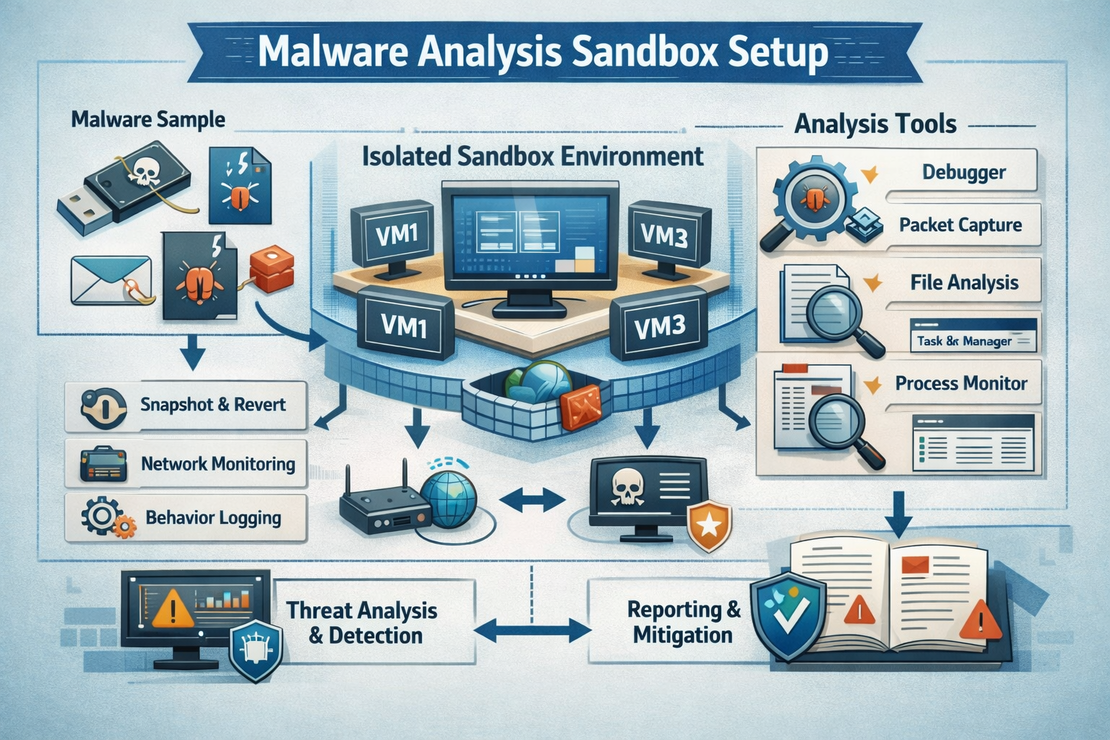
Sandbox Architectuur
┌─────────────────┐    ┌─────────────────┐    ┌─────────────────┐
│   Host Machine  │    │  Monitoring VM  │    │ Analyse VM      │
│                 │    │  (Ubuntu)       │    │  (Windows)      │
│  VMware/VBox    │────│  - Wireshark    │────│  - Target        │
│  - Netwerk      │    │  - tcpdump      │    │  - Malware       │
│    Control      │    │  - Log server   │    │  - Analyse       │
│  - Snapshot     │    │  - IOC storage  │    │    Tools         │
└─────────────────┘    └─────────────────┘    └─────────────────┘
        │                       │                       │
        └───────────────────────┼───────────────────────┘
                                │
                        ┌─────────────────┐
                        │ Geïsoleerd Netwerk│
                        │  - Geen Internet  │
                        │  - Fake Services  │
                        │  - DNS Sinkhole   │
                        └─────────────────┘
Setup Instructies
Virtual Machine Setup
# Creëer Windows 10 Analyse VM
# - 4GB RAM minimum
# - 80GB disk space
# - 2 CPU cores
# - Host-only netwerk adapter

# Installeer Windows 10/11
# - Installeer alle updates
# - Schakel Windows Defender uit (tijdelijk)
# - Installeer .NET Framework 3.5
Analyse Tools Installatie
# Windows PowerShell - Installeer veelvoorkomende tools

# Download en installeer Sysinternals Suite
Invoke-WebRequest -Uri "https://download.sysinternals.com/files/SysinternalsSuite.zip" -OutFile "SysinternalsSuite.zip"
Expand-Archive -Path "SysinternalsSuite.zip" -DestinationPath "C:\Tools\Sysinternals"

# Installeer Sysmon
Invoke-WebRequest -Uri "https://download.sysinternals.com/files/Sysmon.zip" -OutFile "Sysmon.zip"
Expand-Archive -Path "Sysmon.zip" -DestinationPath "C:\Tools\Sysmon"
C:\Tools\Sysmon\Sysmon.exe -i -accepteula -n C:\Tools\Sysmon\sysmon.xml

# Configureer Sysmon voor logging
C:\Tools\Sysmon\Sysmon.exe -c C:\Tools\Sysmon\malware-analysis-config.xml
Netwerk Isolatie Setup
# Ubuntu Monitoring VM setup
sudo apt update && sudo apt install -y tcpdump wireshark-common nginx

# Configureer netwerk interfaces
sudo ip link add br0 type bridge
sudo ip link set br0 up

# Setup fake services
# HTTP server
python3 -m http.server 80

# FTP server
sudo apt install vsftpd
sudo systemctl start vsftpd
Analyse Scripts
Statische Analyse Tool
import hashlib
import peutils
import pefile
import os
import subprocess
from pathlib import Path

class StaticAnalyzer:
    def __init__(self, file_path):
        self.file_path = file_path
        self.file_name = os.path.basename(file_path)
        self.results = {}

    def calculate_hashes(self):
        """Bereken meerdere bestand hashes"""
        hashes = {}

        # MD5
        md5_hash = hashlib.md5()
        # SHA256
        sha256_hash = hashlib.sha256()
        # SHA1
        sha1_hash = hashlib.sha1()

        with open(self.file_path, 'rb') as f:
            chunk = f.read(8192)
            while chunk:
                md5_hash.update(chunk)
                sha256_hash.update(chunk)
                sha1_hash.update(chunk)
                chunk = f.read(8192)

        hashes['md5'] = md5_hash.hexdigest()
        hashes['sha256'] = sha256_hash.hexdigest()
        hashes['sha1'] = sha1_hash.hexdigest()

        return hashes

    def extract_strings(self, min_length=4):
        """Extraheer printbare strings uit binair"""
        strings = []
        try:
            result = subprocess.run(['strings', '-n', str(min_length), self.file_path],
                                  capture_output=True, text=True)
            strings = result.stdout.split('\n')
        except Exception as e:
            print(f"Fout bij extracteren van strings: {e}")

        return [s.strip() for s in strings if s.strip()]

    def analyze_pe_headers(self):
        """Analyseer PE bestand headers"""
        try:
            pe = pefile.PE(self.file_path)

            pe_info = {
                'machine': pe.FILE_HEADER.Machine,
                'timestamp': pe.FILE_HEADER.TimeDateStamp,
                'characteristics': pe.FILE_HEADER.Characteristics,
                'entry_point': pe.OPTIONAL_HEADER.AddressOfEntryPoint,
                'image_base': pe.OPTIONAL_HEADER.ImageBase,
                'sections': [],
                'imports': [],
                'exports': []
            }

            # Sectie informatie
            for section in pe.sections:
                pe_info['sections'].append({
                    'name': section.Name.decode('utf-8').strip('\x00'),
                    'virtual_address': section.VirtualAddress,
                    'size_of_raw_data': section.SizeOfRawData,
                    'characteristics': section.Characteristics
                })

            # Import informatie
            if hasattr(pe, 'DIRECTORY_ENTRY_IMPORT'):
                for entry in pe.DIRECTORY_ENTRY_IMPORT:
                    dll_name = entry.dll.decode('utf-8')
                    imports = []
                    for imp in entry.imports:
                        if imp.name:
                            imports.append(imp.name.decode('utf-8'))
                    pe_info['imports'].append({'dll': dll_name, 'functions': imports})

            return pe_info

        except Exception as e:
            print(f"Fout bij analyseren van PE headers: {e}")
            return None

    def scan_with_yara(self, rules_path):
        """Scan bestand met YARA regels"""
        try:
            import yara
            rules = yara.compile(filepath=rules_path)
            matches = rules.match(self.file_path)

            return [{
                'rule': match.rule,
                'meta': match.meta,
                'strings': match.strings
            } for match in matches]

        except Exception as e:
            print(f"Fout bij scannen met YARA: {e}")
            return []

    def full_analysis(self):
        """Voer volledige statische analyse uit"""
        self.results = {
            'file_name': self.file_name,
            'file_size': os.path.getsize(self.file_path),
            'hashes': self.calculate_hashes(),
            'strings': self.extract_strings(),
            'pe_analysis': self.analyze_pe_headers(),
            'yara_matches': []
        }

        return self.results
Dynamische Monitor Script
import psutil
import time
import subprocess
import threading
from collections import defaultdict

class DynamicMonitor:
    def __init__(self, sample_path, analysis_duration=300):
        self.sample_path = sample_path
        self.analysis_duration = analysis_duration
        self.monitoring_active = False
        self.events = []

    def start_monitoring(self):
        """Start systeem monitoring voor executie"""
        self.monitoring_active = True

        # Start monitoring threads
        threads = [
            threading.Thread(target=self.monitor_processes),
            threading.Thread(target=self.monitor_network),
            threading.Thread(target=self.monitor_file_system),
            threading.Thread(target=self.monitor_registry)
        ]

        for thread in threads:
            thread.daemon = True
            thread.start()

        return threads

    def execute_sample(self):
        """Voer het malware sample uit"""
        try:
            # Start monitoring
            self.start_monitoring()
            time.sleep(2)  # Laat monitoring stabiliseren

            # Execute sample
            subprocess.Popen([self.sample_path], shell=True)

            # Monitor voor gespecificeerde duur
            time.sleep(self.analysis_duration)

            self.monitoring_active = False

        except Exception as e:
            print(f"Fout bij uitvoeren van sample: {e}")

    def monitor_processes(self):
        """Monitor proces creatie en terminatie"""
        initial_processes = {p.pid: p.info for p in psutil.process_iter(['name', 'pid', 'cmdline'])}

        while self.monitoring_active:
            current_processes = {p.pid: p.info for p in psutil.process_iter(['name', 'pid', 'cmdline'])}

            # Nieuwe processen
            for pid, info in current_processes.items():
                if pid not in initial_processes:
                    self.events.append({
                        'timestamp': time.time(),
                        'type': 'process_created',
                        'data': info
                    })

            # Geëindigde processen
            for pid in initial_processes:
                if pid not in current_processes:
                    self.events.append({
                        'timestamp': time.time(),
                        'type': 'process_terminated',
                        'data': initial_processes[pid]
                    })

            time.sleep(1)

    def monitor_network(self):
        """Monitor netwerkverbindingen"""
        while self.monitoring_active:
            try:
                connections = psutil.net_connections()
                for conn in connections:
                    if conn.status == 'ESTABLISHED' and conn.raddr:
                        self.events.append({
                            'timestamp': time.time(),
                            'type': 'network_connection',
                            'data': {
                                'local_address': f"{conn.laddr.ip}:{conn.laddr.port}",
                                'remote_address': f"{conn.raddr.ip}:{conn.raddr.port}",
                                'status': conn.status,
                                'pid': conn.pid
                            }
                        })
            except Exception:
                pass

            time.sleep(2)

    def extract_iocs(self):
        """Extraheer IOCs uit monitoring data"""
        iocs = {
            'processes': set(),
            'network_connections': set(),
            'file_operations': set(),
            'registry_operations': set()
        }

        for event in self.events:
            if event['type'] == 'process_created':
                iocs['processes'].add(event['data']['name'])
            elif event['type'] == 'network_connection':
                iocs['network_connections'].add(event['data']['remote_address'])

        # Converteer sets naar lijsten
        for key in iocs:
            iocs[key] = list(iocs[key])

        return iocs
Analyse Workflow
Statische Analyse Fase
- Bereken bestand hashes
- Extraheer en analyseer strings
- Onderzoek PE headers en imports
- Scan met YARA regels
- Controleer tegen VirusTotal
Dynamische Analyse Fase
- Neem VM snapshot
- Start monitoring tools
- Voer malware sample uit
- Monitor voor gespecificeerde duur
- Verzamel alle monitoring data
Na Analyse
- Herstel VM snapshot
- Extraheer en analyseer IOCs
- Corrleer statische en dynamische bevindingen
- Creëer uitgebreid rapport
Veiligheidsprocedures
Voor Analyse
- Verifieer VM isolatie
- Bevestig netwerk segmentatie
- Update anti-virus definities
- Bereid cleanup procedures voor
Tijdens Analyse
- Verbind analyse VM nooit met productienetwerken
- Gebruik speciaal analyse werkstation
- Monitor resource gebruik zorgvuldig
- Documenteer alle onverwachte gedrag
Na Analyse
- Herstel VM van schone snapshot
- Saniseer alle geëxtraheerde data
- Update detectie signatures
- Rapporteer bevindingen apropriaat
Voorbeeld YARA Regels
rule Suspicious_PE_Characteristics
{
    meta:
        description = "Detecteert verdachte PE bestand karakteristieken"
        author = "SOC Analist"
        date = "2026-02-12"

    strings:
        $suspicious_imports = {
            "CreateRemoteThread" and
            "WriteProcessMemory" and
            "VirtualAllocEx"
        }

        $anti_debug = "IsDebuggerPresent"
        $packing_section = ".upx"

    condition:
        uint16(0) == 0x5A4D and // PE signature
        ($suspicious_imports or $anti_debug or $packing_section)
}

rule Network_Beaconing
{
    meta:
        description = "Detecteert potentieel C2 beaconing in strings"
        author = "SOC Analist"
        date = "2026-02-12"

    strings:
        $http_methods = /(GET|POST|PUT)\s+\/api\//
        $user_agents = /User-Agent:\s+(curl|wget|python)/
        $domains = /[a-z0-9]{20,}\.com/

    condition:
        any of them
}
Verwachte Opleveringen
- Volledige malware analyse rapporten
- Geëxtraheerde IOCs en gedragsdata
- Bijgewerkte YARA detectieregels
- Netwerkverkeer captures
- Blogpost die setup en analyse documenteert
Uitbreidingsideeën
- Geautomatiseerde analyse pipeline
- Integratie met dreigingsinformatie platforms
- Machine learning voor malware classificatie
- Aangepaste sandbox orchestratie
Bronnen
Veiligheidsnotities
- Analyseer alleen malware in geïsoleerde omgeving
- Volg het beveiligingsbeleid van uw organisatie
- Backup kritieke systemen voor analyse
- Verbind analyse VMs nooit met productienetwerken