Malware Analysis Sandbox Setup
- Jean-Christophe Miler
- Soc , Cybersecurity
- February 12, 2026
Table of Contents
Overview
Build a secure malware analysis environment for SOC Analysts to safely analyze malicious samples and extract threat intelligence.
Learning Objectives
- Design and implement a secure malware analysis environment
- Perform static and dynamic malware analysis
- Extract IOCs from malicious samples
- Document malware behavior and capabilities
- Create effective detection rules
Project Structure
malware-analysis-sandbox/
├── setup/
│   ├── virtualization-setup/
│   ├── network-isolation/
│   ├── tools-installation/
│   └── security-hardening/
├── samples/
│   ├── benign/
│   ├── suspicious/
│   └── malware/
├── analysis-scripts/
│   ├── static-analyzer.py
│   ├── dynamic-monitor.py
│   ├── ioc-extractor.py
│   └── report-generator.py
├── tools/
│   ├── yara-rules/
│   ├── config-files/
│   └── monitoring-scripts/
├── documentation/
│   ├── setup-guide.md
│   ├── safety-procedures.md
│   └── analysis-workflows.md
├── reports/
│   └── malware-analysis-template.md
└── README.md
Required Tools & Software
Virtualization Platform
- VMware Workstation/VirtualBox
- Windows 10/11 Analysis VM
- Ubuntu Server for monitoring
- Network isolation configuration
Analysis Tools
Static Analysis
- PEStudio: PE file analysis
- Strings: String extraction
- Exeinfo PE: File identification
- Hash My Files: Hash calculation
- YARA: Pattern matching
Dynamic Analysis
- Process Monitor (ProcMon): System monitoring
- Process Explorer: Process analysis
- Wireshark: Network capture
- API Monitor: API call monitoring
- RegShot: Registry changes
Advanced Tools
- Ghidra: Reverse engineering
- x64dbg: Debugging
- OllyDbg: Alternative debugger
- IDAPRO: Professional disassembler (Optional)
Monitoring & Logging
- OSQuery: System monitoring
- Sysmon: System event logging
- Autoruns: Startup program analysis
- TCPView: Network connection monitoring
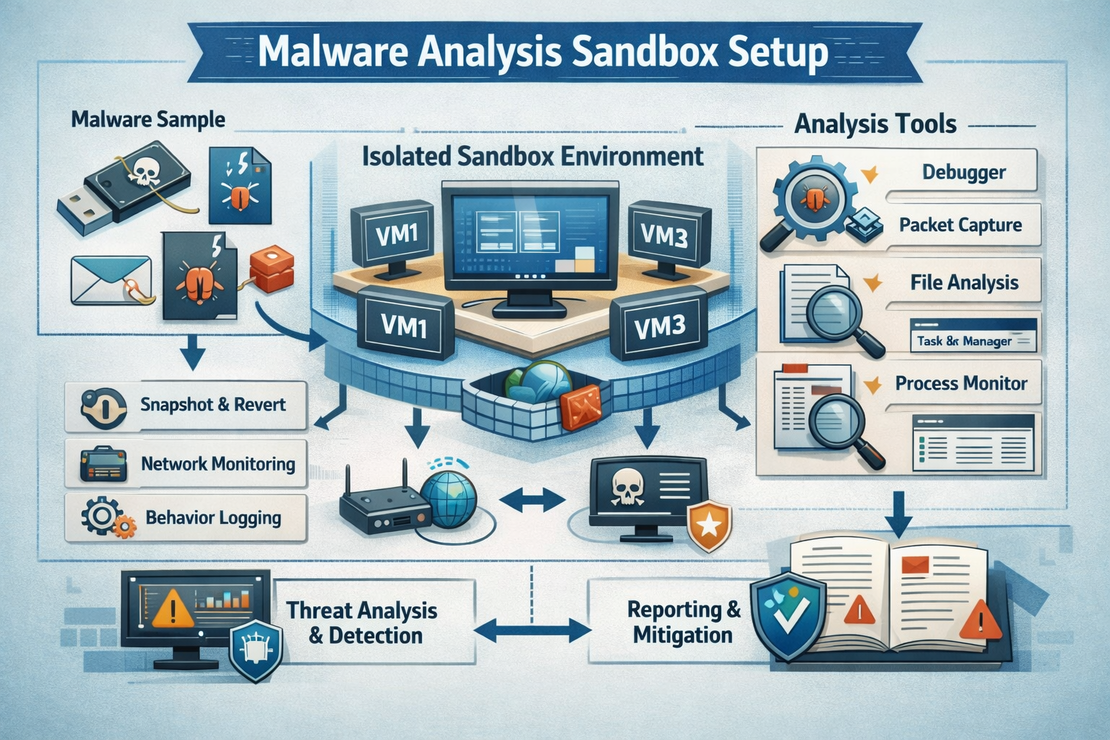
Sandbox Architecture
┌─────────────────┐    ┌─────────────────┐    ┌─────────────────┐
│   Host Machine  │    │  Monitoring VM  │    │ Analysis VM     │
│                 │    │  (Ubuntu)       │    │  (Windows)      │
│  VMware/VBox    │────│  - Wireshark    │────│  - Target       │
│  - Network      │    │  - tcpdump      │    │  - Malware      │
│    Control      │    │  - Log server   │    │  - Analysis     │
│  - Snapshot     │    │  - IOC storage  │    │    Tools        │
└─────────────────┘    └─────────────────┘    └─────────────────┘
        │                       │                       │
        └───────────────────────┼───────────────────────┘
                                │
                        ┌─────────────────┐
                        │ Isolated Network│
                        │  - No Internet  │
                        │  - Fake Services│
                        │  - DNS Sinkhole │
                        └─────────────────┘
Setup Instructions
Virtual Machine Setup
# Create Windows 10 Analysis VM
# - 4GB RAM minimum
# - 80GB disk space
# - 2 CPU cores
# - Host-only network adapter

# Install Windows 10/11
# - Install all updates
# - Disable Windows Defender (temporarily)
# - Install .NET Framework 3.5
Analysis Tools Installation
# Windows PowerShell - Install common tools

# Download and install Sysinternals Suite
Invoke-WebRequest -Uri "https://download.sysinternals.com/files/SysinternalsSuite.zip" -OutFile "SysinternalsSuite.zip"
Expand-Archive -Path "SysinternalsSuite.zip" -DestinationPath "C:\Tools\Sysinternals"

# Install Sysmon
Invoke-WebRequest -Uri "https://download.sysinternals.com/files/Sysmon.zip" -OutFile "Sysmon.zip"
Expand-Archive -Path "Sysmon.zip" -DestinationPath "C:\Tools\Sysmon"
C:\Tools\Sysmon\Sysmon.exe -i -accepteula -n C:\Tools\Sysmon\sysmon.xml

# Configure Sysmon for logging
C:\Tools\Sysmon\Sysmon.exe -c C:\Tools\Sysmon\malware-analysis-config.xml
Network Isolation Setup
# Ubuntu Monitoring VM setup
sudo apt update && sudo apt install -y tcpdump wireshark-common nginx

# Configure network interfaces
sudo ip link add br0 type bridge
sudo ip link set br0 up

# Setup fake services
# HTTP server
python3 -m http.server 80

# FTP server
sudo apt install vsftpd
sudo systemctl start vsftpd
Analysis Scripts
Static Analysis Tool
import hashlib
import peutils
import pefile
import os
import subprocess
from pathlib import Path

class StaticAnalyzer:
    def __init__(self, file_path):
        self.file_path = file_path
        self.file_name = os.path.basename(file_path)
        self.results = {}

    def calculate_hashes(self):
        """Calculate multiple file hashes"""
        hashes = {}

        # MD5
        md5_hash = hashlib.md5()
        # SHA256
        sha256_hash = hashlib.sha256()
        # SHA1
        sha1_hash = hashlib.sha1()

        with open(self.file_path, 'rb') as f:
            chunk = f.read(8192)
            while chunk:
                md5_hash.update(chunk)
                sha256_hash.update(chunk)
                sha1_hash.update(chunk)
                chunk = f.read(8192)

        hashes['md5'] = md5_hash.hexdigest()
        hashes['sha256'] = sha256_hash.hexdigest()
        hashes['sha1'] = sha1_hash.hexdigest()

        return hashes

    def extract_strings(self, min_length=4):
        """Extract printable strings from binary"""
        strings = []
        try:
            result = subprocess.run(['strings', '-n', str(min_length), self.file_path],
                                  capture_output=True, text=True)
            strings = result.stdout.split('\n')
        except Exception as e:
            print(f"Error extracting strings: {e}")

        return [s.strip() for s in strings if s.strip()]

    def analyze_pe_headers(self):
        """Analyze PE file headers"""
        try:
            pe = pefile.PE(self.file_path)

            pe_info = {
                'machine': pe.FILE_HEADER.Machine,
                'timestamp': pe.FILE_HEADER.TimeDateStamp,
                'characteristics': pe.FILE_HEADER.Characteristics,
                'entry_point': pe.OPTIONAL_HEADER.AddressOfEntryPoint,
                'image_base': pe.OPTIONAL_HEADER.ImageBase,
                'sections': [],
                'imports': [],
                'exports': []
            }

            # Section information
            for section in pe.sections:
                pe_info['sections'].append({
                    'name': section.Name.decode('utf-8').strip('\x00'),
                    'virtual_address': section.VirtualAddress,
                    'size_of_raw_data': section.SizeOfRawData,
                    'characteristics': section.Characteristics
                })

            # Import information
            if hasattr(pe, 'DIRECTORY_ENTRY_IMPORT'):
                for entry in pe.DIRECTORY_ENTRY_IMPORT:
                    dll_name = entry.dll.decode('utf-8')
                    imports = []
                    for imp in entry.imports:
                        if imp.name:
                            imports.append(imp.name.decode('utf-8'))
                    pe_info['imports'].append({'dll': dll_name, 'functions': imports})

            return pe_info

        except Exception as e:
            print(f"Error analyzing PE headers: {e}")
            return None

    def scan_with_yara(self, rules_path):
        """Scan file with YARA rules"""
        try:
            import yara
            rules = yara.compile(filepath=rules_path)
            matches = rules.match(self.file_path)

            return [{
                'rule': match.rule,
                'meta': match.meta,
                'strings': match.strings
            } for match in matches]

        except Exception as e:
            print(f"Error scanning with YARA: {e}")
            return []

    def full_analysis(self):
        """Perform complete static analysis"""
        self.results = {
            'file_name': self.file_name,
            'file_size': os.path.getsize(self.file_path),
            'hashes': self.calculate_hashes(),
            'strings': self.extract_strings(),
            'pe_analysis': self.analyze_pe_headers(),
            'yara_matches': []
        }

        return self.results
Dynamic Monitoring Script
import psutil
import time
import subprocess
import threading
from collections import defaultdict

class DynamicMonitor:
    def __init__(self, sample_path, analysis_duration=300):
        self.sample_path = sample_path
        self.analysis_duration = analysis_duration
        self.monitoring_active = False
        self.events = []

    def start_monitoring(self):
        """Start system monitoring before execution"""
        self.monitoring_active = True

        # Start monitoring threads
        threads = [
            threading.Thread(target=self.monitor_processes),
            threading.Thread(target=self.monitor_network),
            threading.Thread(target=self.monitor_file_system),
            threading.Thread(target=self.monitor_registry)
        ]

        for thread in threads:
            thread.daemon = True
            thread.start()

        return threads

    def execute_sample(self):
        """Execute the malware sample"""
        try:
            # Start monitoring
            self.start_monitoring()
            time.sleep(2)  # Let monitoring stabilize

            # Execute sample
            subprocess.Popen([self.sample_path], shell=True)

            # Monitor for specified duration
            time.sleep(self.analysis_duration)

            self.monitoring_active = False

        except Exception as e:
            print(f"Error executing sample: {e}")

    def monitor_processes(self):
        """Monitor process creation and termination"""
        initial_processes = {p.pid: p.info for p in psutil.process_iter(['name', 'pid', 'cmdline'])}

        while self.monitoring_active:
            current_processes = {p.pid: p.info for p in psutil.process_iter(['name', 'pid', 'cmdline'])}

            # New processes
            for pid, info in current_processes.items():
                if pid not in initial_processes:
                    self.events.append({
                        'timestamp': time.time(),
                        'type': 'process_created',
                        'data': info
                    })

            # Terminated processes
            for pid in initial_processes:
                if pid not in current_processes:
                    self.events.append({
                        'timestamp': time.time(),
                        'type': 'process_terminated',
                        'data': initial_processes[pid]
                    })

            time.sleep(1)

    def monitor_network(self):
        """Monitor network connections"""
        while self.monitoring_active:
            try:
                connections = psutil.net_connections()
                for conn in connections:
                    if conn.status == 'ESTABLISHED' and conn.raddr:
                        self.events.append({
                            'timestamp': time.time(),
                            'type': 'network_connection',
                            'data': {
                                'local_address': f"{conn.laddr.ip}:{conn.laddr.port}",
                                'remote_address': f"{conn.raddr.ip}:{conn.raddr.port}",
                                'status': conn.status,
                                'pid': conn.pid
                            }
                        })
            except Exception:
                pass

            time.sleep(2)

    def extract_iocs(self):
        """Extract IOCs from monitoring data"""
        iocs = {
            'processes': set(),
            'network_connections': set(),
            'file_operations': set(),
            'registry_operations': set()
        }

        for event in self.events:
            if event['type'] == 'process_created':
                iocs['processes'].add(event['data']['name'])
            elif event['type'] == 'network_connection':
                iocs['network_connections'].add(event['data']['remote_address'])

        # Convert sets to lists
        for key in iocs:
            iocs[key] = list(iocs[key])

        return iocs
Analysis Workflow
Static Analysis Phase
- Calculate file hashes
- Extract and analyze strings
- Examine PE headers and imports
- Scan with YARA rules
- Check against VirusTotal
Dynamic Analysis Phase
- Take VM snapshot
- Start monitoring tools
- Execute malware sample
- Monitor for specified duration
- Collect all monitoring data
Post-Analysis
- Restore VM snapshot
- Extract and analyze IOCs
- Correlate static and dynamic findings
- Create comprehensive report
Safety Procedures
Before Analysis
- Verify VM isolation
- Confirm network segmentation
- Update anti-virus definitions
- Prepare cleanup procedures
During Analysis
- Never connect analysis VM to production networks
- Use dedicated analysis workstation
- Monitor resource usage carefully
- Document all unexpected behavior
After Analysis
- Restore VM from clean snapshot
- Sanitize all extracted data
- Update detection signatures
- Report findings appropriately
Sample YARA Rules
rule Suspicious_PE_Characteristics
{
    meta:
        description = "Detects suspicious PE file characteristics"
        author = "SOC Analyst"
        date = "2026-02-12"

    strings:
        $suspicious_imports = {
            "CreateRemoteThread" and
            "WriteProcessMemory" and
            "VirtualAllocEx"
        }

        $anti_debug = "IsDebuggerPresent"
        $packing_section = ".upx"

    condition:
        uint16(0) == 0x5A4D and // PE signature
        ($suspicious_imports or $anti_debug or $packing_section)
}

rule Network_Beaconing
{
    meta:
        description = "Detects potential C2 beaconing in strings"
        author = "SOC Analyst"
        date = "2026-02-12"

    strings:
        $http_methods = /(GET|POST|PUT)\s+\/api\//
        $user_agents = /User-Agent:\s+(curl|wget|python)/
        $domains = /[a-z0-9]{20,}\.com/

    condition:
        any of them
}
Expected Deliverables
- Complete malware analysis reports
- Extracted IOCs and behavioral data
- Updated YARA detection rules
- Network traffic captures
- Blog post documenting setup and analysis
Extension Ideas
- Automated analysis pipeline
- Integration with threat intelligence platforms
- Machine learning for malware classification
- Custom sandbox orchestration
Resources
Safety Notes
- Only analyze malware in isolated environment
- Follow your organization’s security policies
- Backup critical systems before analysis
- Never connect analysis VMs to production networks