
LLMFIT - Find the Perfect LLM for Your Hardware
- Jean-Christophe Miler
- Ai , Open source , Developer tools
- March 18, 2026
Table of Contents
Finding the Right LLM for Your Hardware
Running large language models locally has become increasingly popular, but figuring out which models will actually work on your specific hardware setup can be a frustrating trial-and-error process. Enter llmfit, a terminal tool that takes the guesswork out of local LLM deployment by analyzing your system and recommending models that will run well on your machine.
What is llmfit?
llmfit is a command-line tool that detects your system’s RAM, CPU, and GPU capabilities, then scores hundreds of LLM models across multiple dimensions to tell you which ones will actually run well on your hardware. With over 17,400 GitHub stars and 993 forks, it’s quickly becoming the go-to solution for developers and AI enthusiasts who want to run models locally.
- Hardware Detection Automatically identifies your CPU cores, RAM, and GPU (NVIDIA, AMD, Apple Silicon, Intel Arc, or Ascend)
- Multi-Dimensional Scoring Evaluates models on quality, speed, fit, and context length
- Dynamic Quantization Selects the best quantization level that fits your available memory
- Multiple Providers Supports Ollama, llama.cpp, MLX, and Docker Model Runner
- MoE Support Handles Mixture-of-Experts architectures like Mixtral and DeepSeek-V2 correctly
How It Works
llmfit performs a comprehensive analysis of your system and matches it against a database of hundreds of models:
- Hardware Detection - Reads system specs via sysinfo, probes for GPUs using nvidia-smi, rocm-smi, or system_profiler
- Model Database - Compares your hardware against models sourced from HuggingFace, including Meta Llama, Mistral, Qwen, Gemma, Phi, DeepSeek, and many more
- Dynamic Quantization - Walks through quantization levels (Q8_0 to Q2_K) to find the highest quality that fits your memory
- Multi-Dimensional Scoring - Scores each model on Quality, Speed, Fit (memory efficiency), and Context capability
- Fit Analysis - Determines run modes: GPU, MoE (expert offloading), CPU+GPU, or CPU-only
The scoring system weights dimensions differently based on use case. For example, Coding prioritizes Speed, while Reasoning emphasizes Quality.
Installation
Getting started with llmfit is straightforward:
macOS/Linux:
brew install llmfit
Quick install:
curl -fsSL https://llmfit.axjns.dev/install.sh | sh
Windows:
scoop install llmfit
Docker:
docker run ghcr.io/alexsjones/llmfit
Using llmfit
Interactive TUI (Default)
Simply run:
llmfit
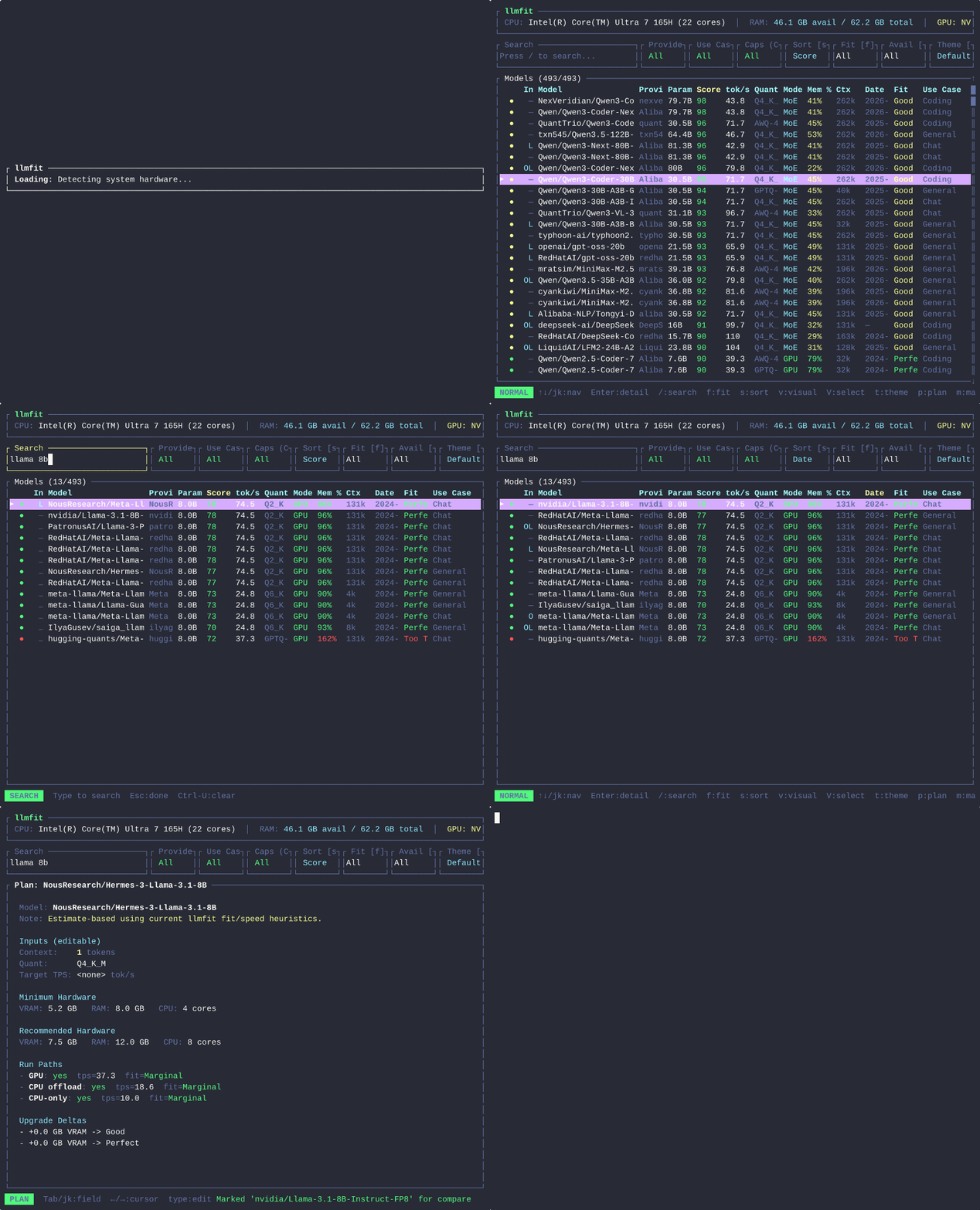
The TUI displays your system specs at the top and shows models ranked by composite score. Navigate with arrow keys or vim-style j/k, search with /, and apply filters with f for fit level or a for availability.
CLI Mode
For scripted or automated workflows:
llmfit --cli
llmfit fit --perfect -n 5
llmfit recommend --json --use-case coding --limit 3
REST API
llmfit can serve as a REST API for cluster schedulers:
llmfit serve --host 0.0.0.0 --port 8787
curl "http://localhost:8787/api/v1/models/top?limit=5&min_fit=good&use_case=coding"
Key Features
- Multi-GPU Support - Aggregates VRAM across all detected GPUs
- Speed Estimation - Uses actual GPU memory bandwidth for accurate throughput predictions
- Visual Mode - Select multiple models for bulk comparison
- Plan Mode - Invert the question: “What hardware do I need for this model?”
- 6 Built-in Themes - Cycle through Dracula, Solarized, Nord, Monokai, Gruvbox, or Default
- Model Download - Press
din TUI to download models directly through Ollama or llama.cpp
Why It Matters
Running LLMs locally offers privacy, cost control, and offline capability, but the barrier to entry has been high. llmfit removes that barrier by making it trivial to find models that work on your specific hardware—no more downloading large model files only to discover they won’t fit in your VRAM.
The project is written in Rust for performance, supports an impressive range of hardware platforms, and integrates seamlessly with popular local LLM runtimes. Whether you have a high-end gaming rig with 24GB of VRAM or a humble laptop with 8GB of unified memory, llmfit will show you exactly what’s possible.