Haruna
- Jean-Christophe Miler
- Open source , Linux
- December 8, 2025
Table of Contents
Haruna: The Minimalist Powerhouse Video Player Built for the Modern Desktop
In the crowded landscape of media players, finding one that strikes the perfect balance between powerful performance, customizability, and a clean, modern interface can be a challenge. Enter Haruna, an elegant, open-source video player built with the robust libmpv library and backed by the expertise of the KDE community. Haruna is designed for users who want a distraction-free viewing experience without sacrificing advanced control.

Built on a Rock-Solid Foundation
Haruna leverages libmpv, one of the most respected media playback engines in the open-source world. This means Haruna provides exceptional compatibility, smooth playback, and low resource usage, capable of handling virtually any video or audio format you throw at it.
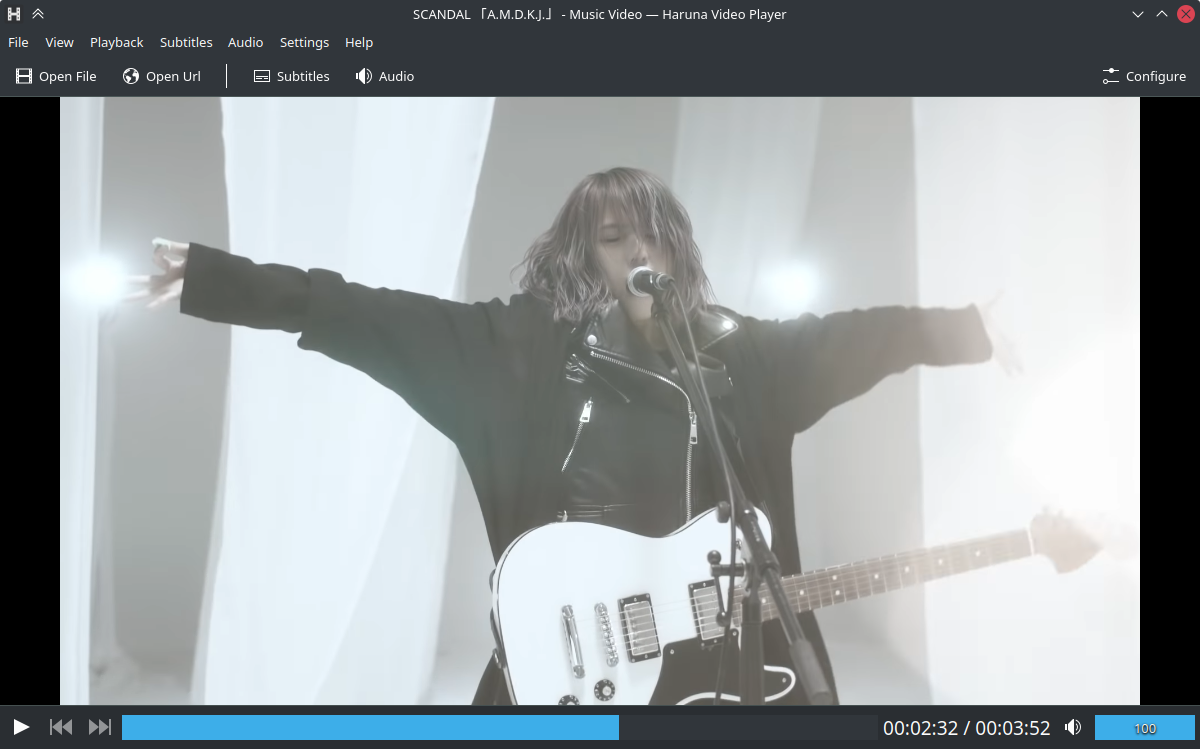
As a player with roots in the KDE ecosystem, Haruna boasts a sleek, intuitive interface that integrates beautifully with modern desktop environments. It supports multiple stunning Theming options, including Breeze Dark, Nordic, and Layan Dark, allowing you to tailor the player’s appearance to match your system or your mood.
Key Features That Elevate Your Viewing
Haruna distinguishes itself through intelligent quality-of-life features that enhance the viewing experience, particularly for heavy media consumers and power users:
Seamless Playlist Management
Forget manually creating playlists. Haruna features an Auto Playlist that automatically populates with all compatible video files found in the same folder as the one you opened. The playlist is easily accessible, featuring three distinct styles (Normal, Thumbnails, and Compact) and can be configured to overlay or resize the video window, keeping your screen tidy.
Native Online Video Support
Why download when you can stream? Haruna integrates with powerful tools like youtube-dl or yt-dlp, allowing you to play online videos directly from platforms like YouTube by simply pasting the link into the player.
Ultimate Customization and Control
For those who prefer keyboard control, Haruna is a dream come true. Nearly every action is triggerable via a keyboard shortcut, which is fully Configurable by the user. Advanced users can even run Custom mpv Commands—whether setting specific properties at startup or executing commands with a quick shortcut.
Smart Navigation and Interaction
Haruna makes navigating long videos quick and effortless:
- Seek Bar Previews: Hovering over the seek bar instantly displays a Video Preview, letting you jump to the exact moment you want without guessing.
- Mouse Actions: Assign specific actions to single or double-clicks of the left, middle, and right mouse buttons, or even the scroll wheel, turning your mouse into a powerful remote control.
- Quick Chapter Jump: A middle-click on the progress bar immediately jumps you to the next chapter, perfect for navigating lectures or complex video files.
- Auto-Skip Chapters: For instructional videos or shows, you can even configure Haruna to Auto Skip Chapters containing specific keywords, helping you jump straight past repetitive content or introductions.
Conclusion: A Player Designed for Efficiency
Haruna is more than just a media player; it’s a focused tool built for efficiency and privacy. It keeps your interface clean by allowing you to hide the menubar and toolbar, ensuring your video takes center stage.
If you are seeking an open-source video player that is fast, highly stable, deeply customizable, and packed with intelligent features for both local and online content, make the switch to Haruna. It’s the smart, community-driven choice for a superior media playback experience.